
The Rise of Single-Serving Software
I'm building specialized apps that do exactly what I want; no more, no less.


Maybe we should call it single-serving software. Or disposable apps. Or micro-tools. Whatever the name, we’re in the very early stages of a huge shift in how software is created and consumed.
For all the hype about how AI is overhyped, people are legitimately using AI to build software. But instead of building apps, games, or tools meant for the masses, they’re building highly personalized tools that do one thing, maybe even just one time. If someone else can make use of it—great—but that’s not the reason your micro-app exists.
To write about something, you have to understand it. To understand it, you have to do it. So, in an effort to better understand the AI story, truly the biggest tech story since the dawn of the internet, I gave myself a crash course in what is sometimes called vibe coding (but let’s be generous and call it AI-assisted coding instead).
My AI coding experiments took two paths. I used Google’s AI Studio to build a simple web app, while simultaneously using the more advanced Curser app to create a Windows system tool.
A micro-app for 3D printing
First, the web app. I’m a 3D-printing fan, so I wanted to build an app to inspire cool 3D-printing projects. I settled on a tool that would take an uploaded image and crop it to the size and shape of a bookmark (50mm x 160mm). Importantly, it also separated the image into four color zones, so that a multi-color 3D printer like the Bambu A1 w/AMS could print it.
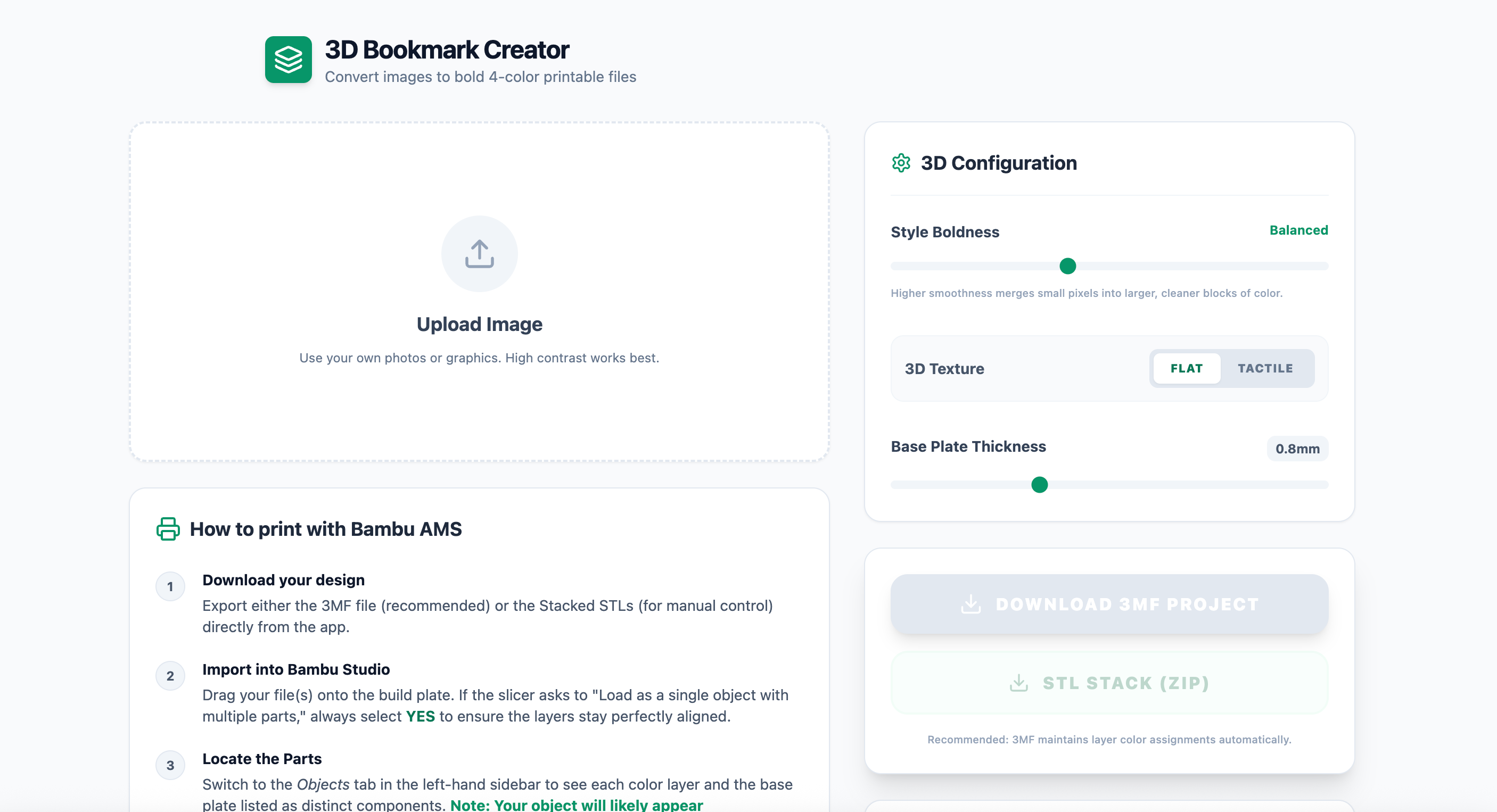
It’s basically an image converter: JPG in, 3MF or STL out.
I described what I wanted to accomplish in a fair amount of detail, and AI Studio went to work. I had a working prototype up that same afternoon, and from there, it was just minor iteration. I added options for flat or textured output (where each color would print at a different height), a gallery of example images, and an embedded YouTube tutorial I recorded.
I figured out how to host the files on github, and how to host the front end and URL on Vercel, which is a hosting platform for cloud-based apps. At my personal project level, the hosting didn’t cost me anything; I only paid for a custom domain name, 3DBookmark.app.
While tinkering, I also came up with the perfect use case for a 3D printer bookmark-maker app. I started using it to create bookmarks for vintage books based on their covers. Even better, I figured out that if you note where on the cover the 160mm length of the bookmark reaches and crop the image (in the 3DBookmark.app tool) to that point, you get a bookmark that perfectly matches the cover at 1:1 scale. So far, I’ve made several and have a huge stack of vintage paperbacks and hardcovers to create custom bookmarks for.
The app is live now at 3DBookmark.app, and I hope you check it out. Now, let’s move on to my *other* new app.
Make your laptop feel like a desktop
Historically, I’ve always reviewed more laptops than desktops. But, perhaps owing to the influence of the Micro Center brand on my thinking, I’ve really warmed up to the desktop experience recently, including having a more-permanent setup with a monitor, keyboard, and mouse, as well as having a PC hooked up to my TV full time.
But I still have a lot of laptops I want to review, and I thought, why not try using some of them as desktops? After all, it’s pretty easy to take a laptop, connect a monitor, keyboard, and mouse, and just use it as a docked PC.
But laptops treat power management differently than desktops. For example, if I leave a laptop in a docked setup for too long, there’s maybe a 50/50 chance that I’ll be able to wake it up by jostling its external peripherals. A good chunk of the time, I’m gonna have to take that laptop, open the lid, and mess around with the power button to get it to wake up.
The idea that every single piece of software needs to be an endless paid subscription packed with extra features you don’t want or need starts to feel like overkill.
And that’s what started my next AI-assisted coding adventure. The idea actually came to me while I was at the airport in Las Vegas, just about to leave CES 2026. Waiting for that little tram that takes you to your terminal, I thought to myself: Why can’t I have a simple app that tells a laptop to behave more like a desktop? Basically, turn off any laptop-related power settings, prevent the system from entering deeper sleep or hibernation, and make sure it wakes on an external input signal.
This was a much bigger lift software-wise than my 3D Bookmark app. It’s a system tool for Windows, vs. a simple web app. I started with Google’s Gemini and used that to work out what the minimum requirements and specs were for this project, which I was already calling the LAD app, short for “Laptop as Desktop.” Gemini and I developed a PRD, or product requirements doc, which I then imported into the Cursor app to actually start coding step-by-step.
As my coding experience pretty much starts and ends with some basic HTML and CSS, I knew I needed some additional help to make sure I was on the right path. For version 1.0, I ended up tag-teaming between Gemini and Cursor. I would have Cursor do some work, then have Gemini review the latest updates and help me figure out the next step.
After about a week of part-time AI-assisted coding, I had a beta app ready to test. The main features included preventing Windows from going into hibernation or any deeper sleep mode; Forcing the system to wake from sleep with any external USB/Bluetooth input, Including an external keyboard or mouse; setting the external display connection as the primary connection and making sure the internal display was completely off; and setting the battery charging to limit itself to 80% to preserve long-term battery life. We’re getting pretty deep into Windows subsystems, so I ran into permission and access issues, most of which were resolved by running my beta app as an administrator and/or ignoring related system warnings.
It’s still a work-in-progress, but LAD App is available right now, also via GitHub.
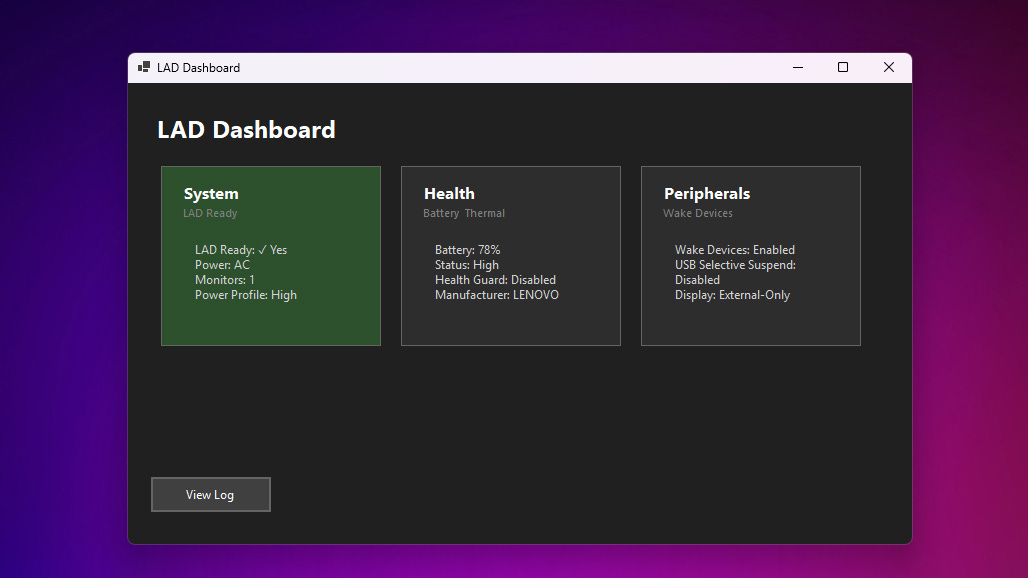
I’ve had it running on several docked laptops for weeks now with no problems. That said, this is beta software that touches on some deep Windows subsystems, so I certainly don’t encourage anyone to download and test the app on a mission-critical laptop.
Consider yourself warned. But if you’d like to check it out yourself, here’s the GitHub link, and I would love any feedback if you happen to test it out.
What does it all mean?
If I can stand up a couple of functional apps in just days, what does that mean for the larger app universe?
The average consumer might not ever get to the point of creating a unique single-serving app to solve a problem or fulfill a need, but a lot of us on the just-slightly-more-technical side certainly might. And once you figure out how to do that, the idea that every single piece of software needs to be an endless paid subscription packed with extra features you don’t want or need starts to feel like overkill.
If anything, this great democratization of app-building feels a lot like how the early consumer internet democratized publishing, allowing anyone to publish a website. The fallout from that continues to this day, both good and bad, but I’d argue that giving more people the power to do more things is usually a net positive.
The Cheat Sheet
Read my NYT-reviewed gaming history book: The Tetris Effect
Play my tabletop game, Techlandia!
Threads: threads.net/@danack
Bsky: danackerman.Bsky.social
LinkedIn: linkedin.com/in/danackerman
TikTok: tiktok.com/@danacknyc
YouTube: youtube.com/danackerman
MC News: microcenter.news